

Step:-1
1. First Download Adobe Air 33 Version https://airsdk.harman.com/download

Step:-2
2. Unzip and create new folder AIR 33 / into Animator installation folder
(for example C:\Program Files\Adobe\Adobe Animate CC 2019)
(for example C:\Program Files\Adobe\Adobe Animate CC 2019)

Note- AIRSDK_Windows My New Air 33 Version.
Step:-3
3. After Unzip Start Your Flash And Select Menu Help/Manage Adobe Air SDK.
Click + button and add the AIR 33 path
(for example C:\Program Files\Adobe\Adobe Animate CC 2019\AIRSDK_Windows)
(for example C:\Program Files\Adobe\Adobe Animate CC 2019\AIRSDK_Windows)
 - Restart Animate (if needed), check to Publish settings and you should see AIR 33 listed.
Step:-4
It's Your 32-bit Apk. You need Two Apk One 32bit And Second 64bit Code.
Now Let's Go To Publish 64bit App.  | |
Your App Name Should Be (YourAppname(32bit).apk).
 |
Note App Name.
Step:-5
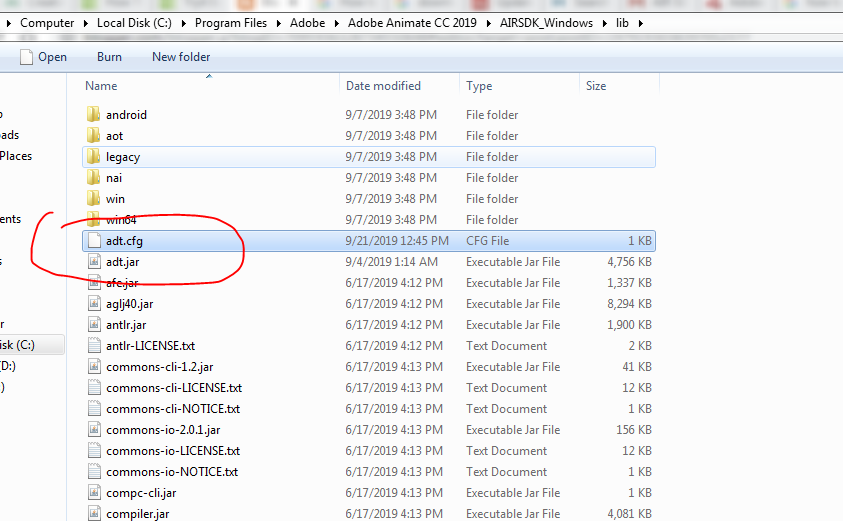
5. Publishing 64bit Apk Make txt. the file name should be adt.cfg and open it
with notepad paste below code.
................................................................
DefaultArch=armv8
OverrideArch=armv8 ................................................................... After paste save it and move it in your air SDK lib folder. |
Step:-6
Thank you.
Latest Post
Download My Educational Games:-
2. Daily Math
https://play.google.com/store/apps/details?id=air.com.Myapp.DailyGame
3. See Latest Game
https://play.google.com/store/apps/details?id=air.com.Myapp.DailyGame
3. See Latest Game



15 Comments
Thanks for this.
ReplyDelete☺😊
DeleteNice post thanks for share This valuble knowledge
Deletehow can we publish these two apk in play store. as i think there we can publish only one apk now.
ReplyDeleteSee Step:- 4 Image there are tow app. one 64bit and one 32bit. you can drag simply on google play console and upload both App. We can't bundle it with animate cc.
Deletei can publish to playstore, but 64bit can't support admob ANE. can provide relevant information?
ReplyDeleteHere's open source
Deletehttps://github.com/tuarua/AdMob-ANE
you'll have to compile the the source to 64bit yourself.
Remember: increase version number between 32 and 64 bit or play store will not accept it.
ReplyDeleteI.e. 32bit: 1.7.1, 64 bit 1.7.2
Yeah, Good Comment.
DeleteEntonces debo nombrar los apk así?
ReplyDeletename(64bit.apk)
name(32bit.apk)
So should I name the apk files like this?
ReplyDeletename (64bit.apk)
name (32bit.apk)
hi
ReplyDeleteI need emulator how can play apk 64bit files
download bluestacks
Deletehttps://www.bluestacks.com/
This method didn't work. Is there a new method?
ReplyDeleteDownload and install latest version of animate cc and air sdk and simple publish 64bit apk and 32bit apk.
Delete